
Seamless Shipping
Fast, reliable delivery with Real-time tracking and updates
Scan To Login
Explore the web version of BossClub55, a no-download game that delivers an exceptional online gaming experience. Enjoy all the excitement you crave in one place and across multiple devices with just a click.
The BossClub55 web version enhances user accessibility by eliminating the need for downloads. Players can enjoy a seamless gaming experience across app, mobile web, and desktop platforms, including Windows, Mac, Linux, iOS, and Android.
It uses minimal hard drive space compared to traditional applications and features automatic updates for the latest enhancements and bug fixes.
Security is a priority, with HTTPS encryption safeguarding user data. The web version also includes shareable links for easy promotion via email, messaging, or social media.
In summary, BossClub55's web version offers accessibility, convenience, and security, providing a top-notch gaming experience across all major platforms.
Moorah Login provides existing customers with a straightforward way to access their account using a registered phone number and password. Customers can Sign In through the supported Web or H5 login interface, while first-time users can select the OTP login option to access their account.
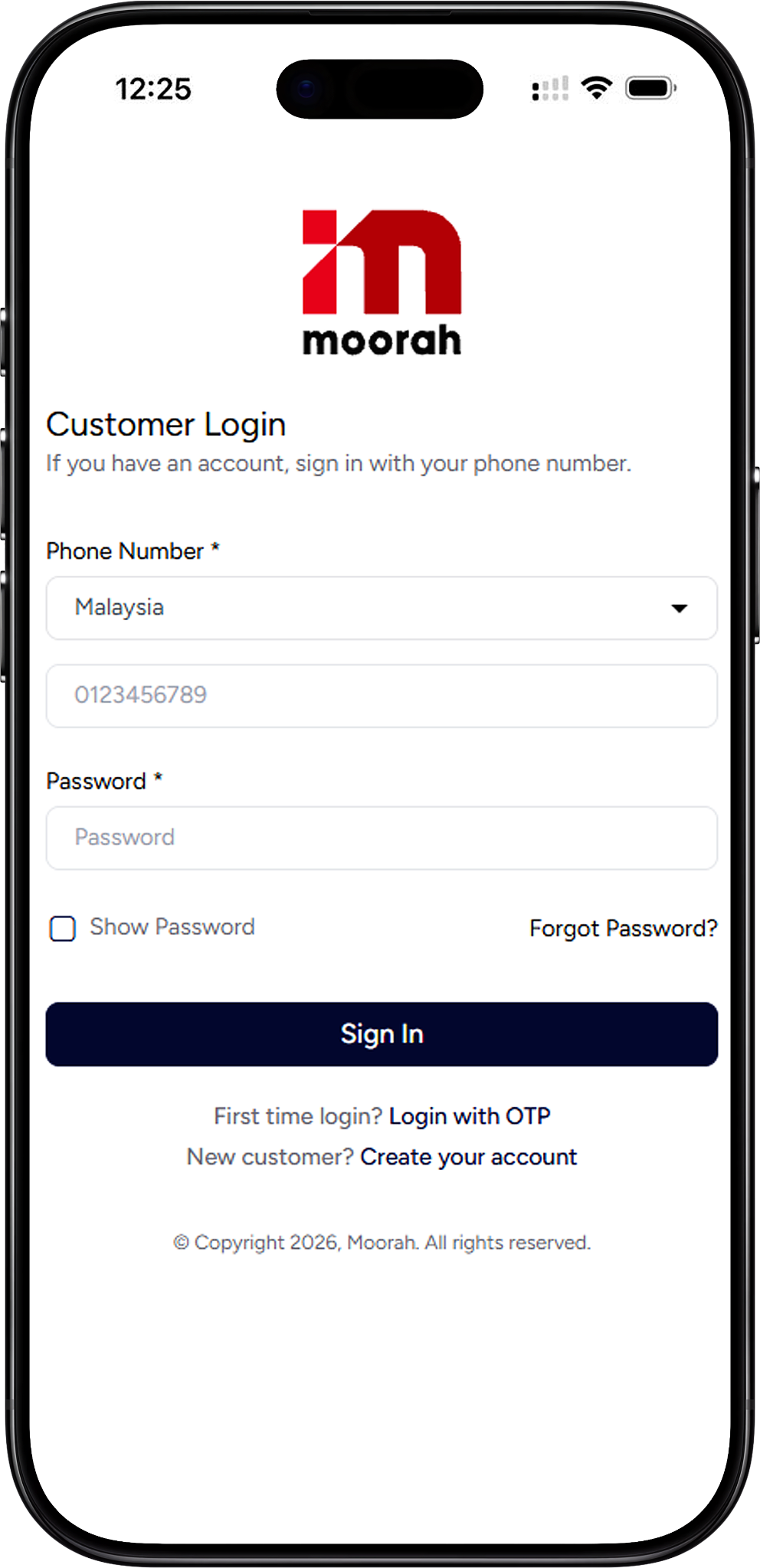
Follow the steps below to Sign In to your Moorah account using the customer login page.
Access the Moorah customer login page through the supported Web or H5 interface. The login form provides fields for your phone number and password.
Use the country selector beside the phone number field and choose the appropriate country before entering your account details.
Type the phone number associated with your Moorah account into the Phone Number field. Check the number before continuing to avoid incorrect login details.
Enter your account password in the Password field. You can use the Show Password option when you need to check the characters you have entered.
After confirming your phone number and password, select Sign In to proceed with the Moorah Login and access your account.
Moorah provides login access designed for customers returning to their existing accounts. The available options shown on the login page help users access their account according to their login situation.
Existing customers can use their registered phone number and password for regular account access. Enter both details in the customer login form and select Sign In.
Customers using the Moorah Web or H5 interface can access the login page without changing the standard sign-in process. Use your existing account credentials to continue.
Customers accessing their account for the first time can use the Login with OTP option displayed below the Sign In button.
Select Login with OTP when completing your first-time login instead of using the standard password Sign In option.
Follow the OTP login process presented by Moorah to continue accessing your account. Enter the requested information carefully when completing the verification process.
The login page includes options that can help customers manage password entry or proceed when they cannot remember their password.
Select Show Password if you want to view the password characters while entering your login credentials. This can help you check your entry before selecting Sign In.
If you cannot remember your account password, select Forgot Password? from the login page and follow the available instructions to continue.
The Moorah Login page is intended for existing customers. New customers can select Create your account from the login screen to proceed to account registration.
Existing customers can Sign In using their phone number and password through the Moorah customer login page.
Yes. Moorah Login supports account access through the Web or H5 interface using the applicable login details.
Select Login with OTP from the customer login page and follow the displayed OTP process for first-time account access.
Select Forgot Password? on the Moorah Login page and follow the instructions provided to continue with password assistance.
Select Create your account below the login form if you are a new customer and need to proceed with registration.
Enter your registered phone number and password to complete Moorah Login, or use the OTP option if you are accessing your account for the first time.
Fast, reliable delivery with Real-time tracking and updates

Earn bonuses for every friend you invite

Win Jackpot by purchasing products

Get assistance on 8AM - 8PM daily